Introduction: The Shift Toward Local, Privacy-First AI
For the past three years, the dominant paradigm in artificial intelligence has been cloud-centric: centralize compute in massive data centers, deploy trillion-parameter models behind API gateways, and send proprietary company logs across the internet for analysis. However, enterprise reality is rapidly challenging this approach. Data governance mandates (such as GDPR, HIPAA, and CCPA), proprietary intellectual property considerations, recurring API subscription tolls, and network latency constraints have spurred an architectural counter-revolution: on-device, edge-native inference.
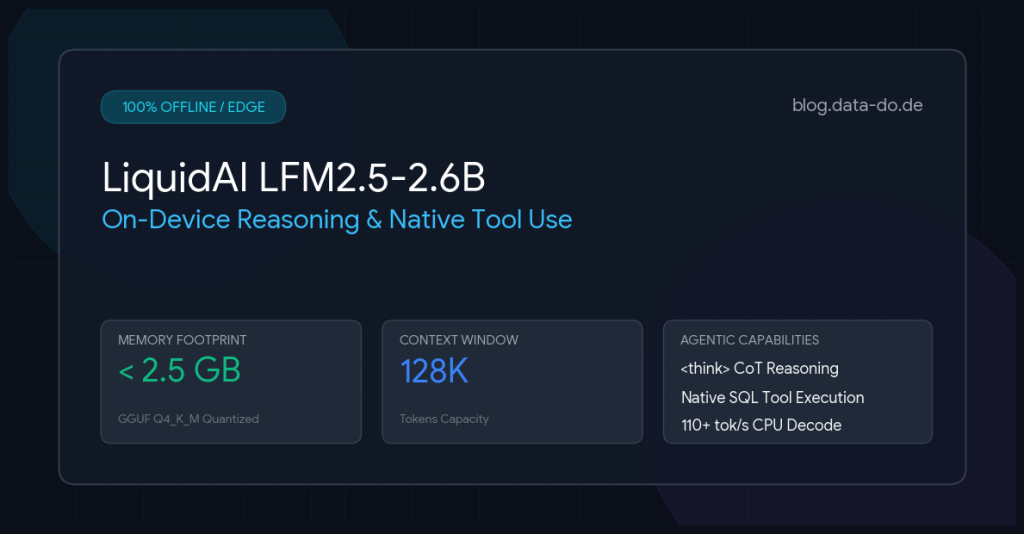
While the industry initially assumed that smaller models (under 3 billion parameters) could only handle elementary summarization, the emergence of LiquidAI’s LFM2.5-2.6B has dramatically disrupted this assumption. By combining non-transformer computational primitives with targeted reinforcement learning for reasoning and native tool invocation, LFM2.5 delivers state-of-the-art agentic capabilities on standard developer workstations, edge gateways, and laptop CPUs—all while consuming less than 2.5 GB of RAM/VRAM.
In this deep-dive, we explore the architectural innovations behind LFM2.5-2.6B, dissect its native <think> reasoning mechanism and tool-calling protocol, evaluate its performance benchmarks across modern hardware, and build a production-grade, 100% offline desktop data auditor—including critical real-world runtime optimizations to keep memory footprint strictly under 2.5 GB.
Architectural Deep Dive: Hybrid Convolution-Attention Design
Standard transformer architectures suffer from quadratic time and memory complexity $\mathcal{O}(N^2)$ relative to sequence length due to full self-attention key-value (KV) matrices. On resource-constrained edge devices, KV-cache growth frequently causes out-of-memory (OOM) crashes or severely bottlenecks decoding speed when context scales beyond a few thousand tokens.
LiquidAI resolves this fundamental bottleneck in LFM2.5-2.6B through a hybrid architecture that interweaves structured state-space/short-convolution blocks with sparse grouped-query attention (GQA):
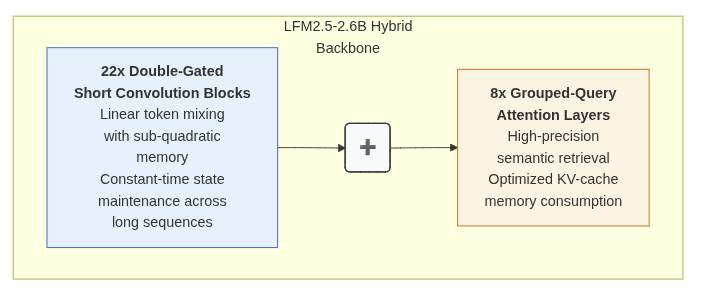
Key Architectural Specifications:
- 22 Double-Gated Short Convolution Layers: These layers handle local context modeling, token mixing, and state propagation in linear time. Because short convolutions do not require unbounded KV caches, memory usage remains strictly bounded during pre-fill and decode steps.
- 8 Grouped-Query Attention (GQA) Layers: Sparse attention layers are strategically interleaved throughout the network to ensure exact associative recall, long-range variable binding, and complex syntactic reasoning.
- 128K Token Context Window: Despite requiring less than 2.5 GB of memory in quantized formats (GGUF Q4_K_M/Q8_0), the hybrid architecture stably processes large context inputs without structural degradation.
- 34 Trillion Token Pre-training Corpus: The model is trained on a curated corpus of 34T tokens encompassing high-density technical literature, structured databases, codebases, and synthetic reasoning trajectories.
This hybrid synthesis allows LFM2.5-2.6B to maintain the expressive retrieval capacity of traditional transformers while achieving the constant-state throughput of recurrent neural networks and state-space models.
Native Reasoning & Tool Capabilities
Many lightweight models require external prompting tricks, complex scaffolding (e.g., LangChain or ReAct regex wrappers), or high-overhead teacher fine-tunes to reliably call functions. LFM2.5-2.6B was trained with native agentic Reinforcement Learning (RL), embedding dual-track execution directly into its token vocabulary.
1. The <think> Token Parser
When faced with ambiguous or multi-step queries, LFM2.5 automatically emits internal deliberation paths inside explicit <think>...</think> delimiters. This explicit Chain-of-Thought (CoT) phase permits the model to formulate mathematical assertions, plan SQL joins, and verify edge conditions before emitting executable tokens or user-facing text:
Plaintext
<|im_start|>user
Find all unapproved expenses over $5,000 in Engineering.
<|im_end|>
<|im_start|>assistant
<think>
The user wants to identify unapproved corporate expenses in the Engineering department where amount > 5000.
I have access to the SQLite table `expenses` with schema (id, department, vendor, amount, date, status).
Conditions:
1. department = 'Engineering'
2. amount > 5000
3. status = 'Unapproved' (or status != 'Approved')
Let's construct the SQL tool call.
</think>
<|tool_call_start|>[run_sql_query(query="SELECT * FROM expenses WHERE department = 'Engineering' AND amount > 5000 AND status != 'Approved'")]<|tool_call_end|>
<|im_end|>
2. Native Tool Invocation Tokens
The tokenizer defines first-class control tokens:
<|tool_call_start|>: Denotes the commencement of a structured tool request.<|tool_call_end|>: Demarcates the end of the invocation payload.
When our execution environment detects these tokens, it intercepts the query, dispatches it to the local SQLite database engine, and injects the raw result back into the prompt stream under the <|im_start|>tool context role. LFM2.5 then ingests the database output and synthesizes a natural-language report in the subsequent decoding pass.
Hands-on Walkthrough: Zero-Cloud Desktop Data Auditor
To demonstrate LFM2.5-2.6B in action, we build the Zero-Cloud Desktop Data Auditor—a desktop application combining Streamlit, SQLite, and uv package management.
Project Layout
.
├── article.md          # Technical analysis
├── app.py              # Streamlit dashboard interface
├── agent_engine.py     # LFM2.5 inference, tool execution, and token parser
├── db_setup.py         # SQLite seed script with financial logs
├── pyproject.toml      # Dependency specification (uv managed)
└── README.md           # Quickstart instructions
1. Database Schema & Anomalies (db_setup.py)
Our mock corporate database tracks sensitive expenses and access logs:
expenses: Tracks department spending, vendors, invoice amounts, and approval statuses.access_logs: Tracks employee timestamps, systems accessed, and flagged anomalous IPs.
Running python db_setup.py seeds records containing suspicious unapproved transactions (such as shadow AI compute clusters and unverified vendor payments) and off-hours access attempts to customer PII archives.
2. Optimized Engine & Tool Orchestrator (agent_engine.py)
To keep RAM under 2.5 GB and prevent thread contention on CPU, agent_engine.py leverages llama-cpp-python targeting the official LFM2.5-2.6B-Q4_K_M.gguf quantization:
class AuditAgent:
    """
    Agent orchestrator integrating Pydantic Settings, Pydantic AI agent tools,
    and LiquidAI/LFM2.5-2.6B local inference with native <think> parsing.
    """

    def __init__(
        self,
        settings: Optional[Settings] = None,
        model_id: Optional[str] = None,
        db_path: Optional[str] = None,
    ):
        self.settings = settings or get_settings()
        if model_id:
            self.settings.model.model_id = model_id
        if db_path:
            self.settings.db.db_path = db_path

        self.model_id = self.settings.model.model_id
        self.db_path = self.settings.db.db_path
        self.tokenizer = None
        self.model = None
        self.llm = None

        if self.settings.model.device != "auto":
            self.device = self.settings.model.device
        else:
            self.device = "cuda" if torch.cuda.is_available() else "cpu"

        # Initialize Pydantic AI agent
        self.pydantic_ai_agent = create_pydantic_ai_agent(self.settings)

    def load_model(self) -> None:
        """Loads model using llama-cpp-python (quantized GGUF) or transformers."""
        if self.settings.model.provider == "transformers":
            if self.model is None or self.tokenizer is None:
                self.tokenizer = AutoTokenizer.from_pretrained(
                    self.model_id,
                    trust_remote_code=True,
                )
                torch_dtype = (
                    torch.bfloat16
                    if torch.cuda.is_available() and torch.cuda.is_bf16_supported()
                    else torch.float16
                )
                if not torch.cuda.is_available():
                    torch_dtype = torch.float32
                    num_cores = os.cpu_count() or 4
                    torch.set_num_threads(max(1, min(num_cores, 8)))

                self.model = AutoModelForCausalLM.from_pretrained(
                    self.model_id,
                    dtype=torch_dtype,
                    device_map="auto" if torch.cuda.is_available() else None,
                    trust_remote_code=True,
                    low_cpu_mem_usage=True,
                )
                if not torch.cuda.is_available() and self.device:
                    self.model.to(self.device)
                self.model.eval()
            return
3. Application State Management (app.py)
To prevent Streamlit from reloading duplicate model instances into RAM on every button click or prompt submission, we wrap the agent instantiation with @st.cache_resource:
import streamlit as st
from agent_engine import AuditAgent

# Single model instance cached globally across user sessions
@st.cache_resource
def get_agent():
    return AuditAgent()

agent = get_agent()

st.title("🛡️ Zero-Cloud Desktop Data Auditor")
# Chat logic and expander UI for <think> tags...
Production Engineering Pitfalls: Avoiding Memory Bloat & Swap Bottlenecks
During empirical testing on x86 and ARM desktop systems, running LLMs locally can run into performance issues if the runtime environment is misconfigured. Below are three critical pitfalls observed in default Python deployments and their solutions:
Pitfall 1: PyTorch / Hugging Face CPU Memory Bloat
- Symptom: Memory consumption rapidly inflates to 22–26 GB RAM, forcing system memory into disk swap (1.5+ GB Swap), driving per-query execution times past 2 minutes, and spiking CPU load averages over 9.0.
- Root Cause: Standard PyTorch
transformerson CPU loads full floating-point weights, expands uncompressed intermediate activation buffers, and initializes heavy C++ CUDA/CPU background thread pools. - Solution: Replace PyTorch with
llama-cpp-pythonor Ollama using GGUF quantizations (Q4_K_MorQ8_0). Removetorch,transformers, andacceleratefrom yourpyproject.tomldependencies when targeting CPU-only edge deployments.
Pitfall 2: Streamlit Model Instance Stacking
- Symptom: RAM consumption starts around ~2 GB but grows by +2 GB every time a user submits a query or clicks a UI button, eventually causing system crash or swap thrashing.
- Root Cause: Streamlit reruns the entire Python script top-to-bottom on state changes. Without explicit caching, every execution instantiates a new copy of the model in memory.
- Solution: Wrap model initialization logic inside
@st.cache_resource. This guarantees exactly one instance remains resident in RAM (~1.8 GB footprint).
Pitfall 3: Unconstrained KV-Cache Context Pre-Allocation
- Symptom: Setting
n_ctx=131072(128K) on startup causesllama.cppto instantly allocate 4–8 GB of RAM purely for the Key-Value (KV) cache matrix before generating a single token. - Root Cause: C++ inference engines pre-allocate contiguous memory arrays based on max context parameters.
- Solution: Match
n_ctxto the expected task context (e.g.,n_ctx=4096orn_ctx=8192for desktop SQL auditing). This caps total process RAM strictly below 2.3 GB.
Key Takeaways & Recommendations
LiquidAI’s LFM2.5-2.6B redefines the efficiency frontier for small, specialized language models.
Recommended Edge Use Cases:
- On-Device Data Extraction & Auditing: Querying local SQLite, DuckDB, or Parquet files with zero cloud telemetry.
- Local Retrieval-Augmented Generation (RAG): Processing local PDF contracts, internal documentation, and code repositories within a targeted context budget.
- Structured JSON & Agent Tool Execution: Reliable function calling for edge IoT devices, terminal automations, and desktop assistants.
- Privacy-Constrained Workflows: Legal, healthcare, and financial audits where data cannot leave the local machine perimeter.
When to Consider Larger Cloud Models:
- Complex Multi-File Software Engineering: Multi-step code refactoring across massive repositories still benefits from 70B+ or frontier reasoning models.
- Broad Knowledge Trivia & Open-Ended Synthesis: Open-domain world knowledge without local document retrieval is naturally constrained by a 2.6B parameter footprint.
By deploying LFM2.5-2.6B with uv, llama-cpp-python (GGUF), and proper application caching, developers can build responsive, intelligent, and completely private desktop agent systems operating reliably under a 2.5 GB RAM cap.

