Cloud data warehouses often present teams with a difficult trade-off: either accept unpredictable SaaS compute bills or take on the operational overhead of running heavy distributed query engines like Trino or Spark. Furthermore, modern analytical platforms increasingly require bridging structured analytical files with operational relational records and vector embeddings for retrieval-augmented generation (RAG) and semantic similarity search.
By deploying DuckDB inside Kubernetes, you can achieve sub-second analytical queries directly across raw object storage (via httpfs) and transactional/vector data residing in PostgreSQL with pgvector (via the postgres_scanner and vss extensions)—combining an in-process vectorized engine with cloud-native scalability, zero vendor lock-in, and native Kubeflow integration.
Here is an architectural deep dive into how to build this unified analytical and semantic query layer on Kubernetes.
Architectural Overview
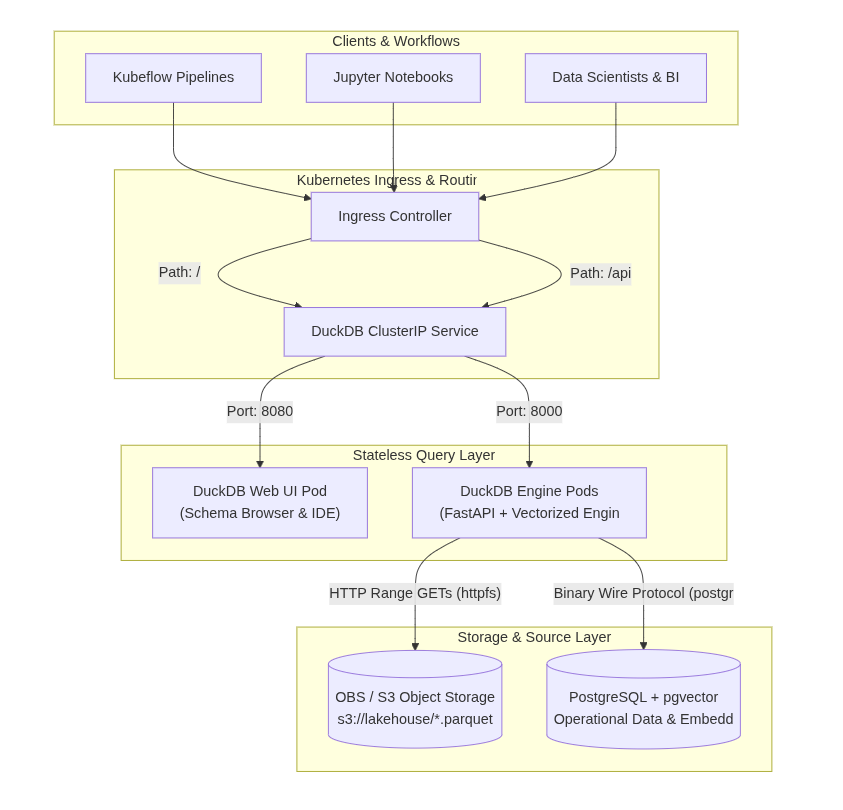
The core design principle is stateless compute decoupled from durable object storage and operational databases. The DuckDB engine pods retain no persistent disk state; instead, they execute vectorized SQL queries federating directly across remote Parquet files on S3 and vector tables in PostgreSQL via connection pooling.
| Component | Resource / Technology | Description |
| Service Endpoint | Kubernetes ClusterIP / Ingress Service | Exposes REST and Arrow Flight SQL endpoints (/api) alongside the interactive Web UI (/) to Kubeflow Notebooks, pipeline tasks, and data science workloads. |
| DuckDB Engine Pod | FastAPI / Python + DuckDB Native | Stateless query runner executing vectorized SQL queries, federated joins, and vector distance operations over HTTP range requests and Postgres sockets. |
| DuckDB Web UI Pod | DuckDB-UI / Web GUI Container | Interactive web console for visual SQL exploration, schema inspection, and ad-hoc federated query execution. |
| Storage Connection | S3 Bucket via httpfs | Streams Parquet metadata, footers, and filtered row groups directly from object storage without full-file downloads. |
| Relational & Vector Source | PostgreSQL + pgvector via postgres_scanner | Attached relational database storing operational entities and high-dimensional embeddings for similarity searches. |
Key Components in Detail
Storage Connections: Object Storage & PostgreSQL / pgvector
S3 via httpfs
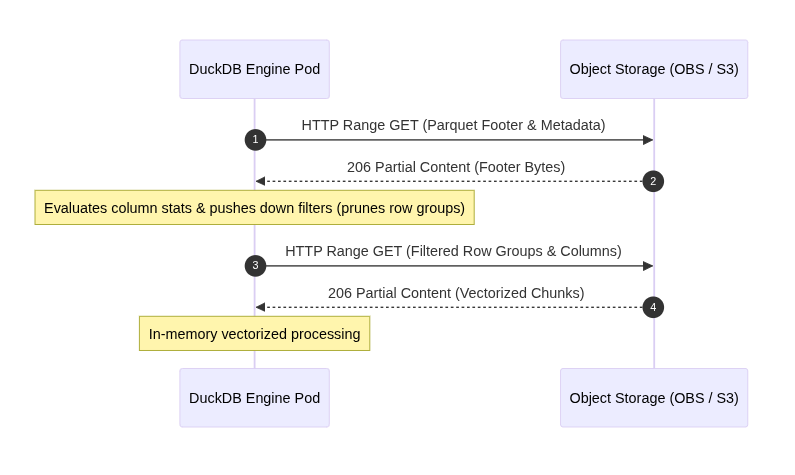
Traditional data processing pipelines download entire dataset dumps to a local volume before executing SQL queries. DuckDB circumvents this via its native httpfs extension, which communicates with S3-compatible Object Storage Services (MinIO, Ceph, AWS S3).
When DuckDB reads a Parquet file over S3:
- It issues targeted HTTP byte-range requests to fetch the Parquet file footer (schema, column statistics, dictionary pages).
- It pushes down query projections and filter predicates ($min/max$ metadata checks) to determine which row groups are needed.
- It fetches only the required byte ranges directly into memory.
PostgreSQL + pgvector via postgres_scanner
Using the postgres_scanner extension, DuckDB connects directly to PostgreSQL using the binary protocol to read tables on the fly without staging them to disk. When paired with pgvector, DuckDB can read embeddings (stored as vector or array types) and execute hybrid joins—such as enriching historical parquet transaction logs with live user profile vectors and product similarity scores.
INSTALL httpfs;
LOAD httpfs;
INSTALL postgres_scanner;
LOAD postgres_scanner;

-- Configure S3 credentials
SET s3_endpoint = 's3_endpoint_path';
SET s3_url_style = 'path';
SET s3_use_ssl = true;
SET s3_access_key_id = '${STORAGE_ACCESS_KEY}';
SET s3_secret_access_key = '${STORAGE_SECRET_KEY}';

-- Attach PostgreSQL database dynamically
CALL postgres_attach('dbname=analytics user=postgres host=postgres-service.analytics.svc.cluster.local password=${POSTGRES_PASSWORD} port=5432', source_schema='public');

-- Federated Query: Join massive Parquet lakehouse logs with pgvector customer embeddings
SELECT
    l.customer_id,
    p.customer_segment,
    p.embedding,
    COUNT(DISTINCT l.transaction_id) AS total_orders,
    ROUND(SUM(l.sale_amount), 2) AS total_revenue
FROM read_parquet('s3://lakehouse-gold/sales/year=2026/*.parquet') l
JOIN analytics.customer_profiles p ON l.customer_id = p.id
WHERE l.status = 'COMPLETED'
GROUP BY l.customer_id, p.customer_segment, p.embedding
ORDER BY total_revenue DESC
LIMIT 50;
The Engine Pod: Python Native + FastAPI
The engine pod acts as an analytical proxy. Built with FastAPI and native DuckDB bindings, it accepts SQL payloads or structured parameter blocks, runs them against the engine, and returns results in Apache Arrow format or JSON.
Using Apache Arrow Flight SQL or raw Arrow IPC buffers drastically minimizes serialization latency. Unlike traditional JDBC/ODBC connections that incur heavy CPU overhead converting tabular records to JSON/tuples, Arrow retains zero-copy columnar data structures from DuckDB straight to downstream clients.
A lightweight production wrapper (app.py):
import duckdb
from fastapi import FastAPI, HTTPException
from pydantic import BaseModel
import pyarrow as pa
import io
import os

app = FastAPI(title="DuckDB K8s Federated Engine")

class QueryPayload(BaseModel):
    query: str

def get_connection():
    con = duckdb.connect(database=":memory:")

    # Load storage and database extensions
    con.execute("INSTALL httpfs; LOAD httpfs;")
    con.execute("INSTALL postgres_scanner; LOAD postgres_scanner;")

    # Object storage configuration
    con.execute(f"SET s3_endpoint = '{os.getenv('S3_ENDPOINT')}';")
    con.execute(f"SET s3_access_key_id = '{os.getenv('S3_ACCESS_KEY')}';")
    con.execute(f"SET s3_secret_access_key = '{os.getenv('S3_SECRET_KEY')}';")

    # Engine limits & concurrency
    con.execute(f"SET threads = {os.getenv('DUCKDB_THREADS', '4')};")
    con.execute(f"SET max_memory = '{os.getenv('DUCKDB_MAX_MEMORY', '8GB')}';")

    # Attach Postgres & pgvector source
    pg_conn = (
        f"dbname={os.getenv('POSTGRES_DB', 'analytics')} "
        f"user={os.getenv('POSTGRES_USER', 'postgres')} "
        f"host={os.getenv('POSTGRES_HOST', 'postgres-service.analytics.svc.cluster.local')} "
        f"password={os.getenv('POSTGRES_PASSWORD')} "
        f"port={os.getenv('POSTGRES_PORT', '5432')}"
    )
    con.execute(f"CALL postgres_attach('{pg_conn}', source_schema='public');")
    return con

@app.post("/api/query")
def execute_query(payload: QueryPayload):
    try:
        con = get_connection()
        arrow_table: pa.Table = con.execute(payload.query).arrow()

        # Serialize Arrow table to IPC stream
        sink = io.BytesIO()
        with pa.ipc.new_stream(sink, arrow_table.schema) as writer:
            writer.write_table(arrow_table)

        con.close()
        return sink.getvalue()
    except Exception as e:
        raise HTTPException(status_code=400, detail=str(e))
Visual Exploration: DuckDB Web UI Pod
For data scientists and analysts accustomed to browser-based SQL consoles, pairing the stateless engine with a dedicated UI container provides parity with modern cloud data warehouse interfaces.
The UI container connects to the query engine or mounts identical httpfs and Postgres credentials, allowing users to:
- Inspect remote schemas and explore partitions across S3 paths.
- Inspect PostgreSQL catalog tables, view metadata, and check vector column dimensions directly.
- Interactively test filter predicates, joins, and aggregations before committing code to production DAGs.
- Download ad-hoc result sets directly as Parquet or CSV.
Kubernetes Service & Ingress Routing
A standard Kubernetes Deployment coupled with a unified Ingress exposes both components under a single domain, isolating operational concerns:
apiVersion: v1
kind: Service
metadata:
  name: duckdb-service
  namespace: analytics
spec:
  type: ClusterIP
  ports:
    - name: http-engine
      port: 8000
      targetPort: 8000
    - name: http-ui
      port: 8080
      targetPort: 8080
  selector:
    app: duckdb-warehouse
---
apiVersion: networking.k8s.io/v1
kind: Ingress
metadata:
  name: duckdb-ingress
  namespace: analytics
  annotations:
    kubernetes.io/ingress.class: nginx
spec:
  rules:
  - host: warehouse.internal.data-do.de
    http:
      paths:
      - path: /api
        pathType: Prefix
        backend:
          service:
            name: duckdb-service
            port:
              number: 8000
      - path: /
        pathType: Prefix
        backend:
          service:
            name: duckdb-service
            port:
              number: 8080
Operational Advantages
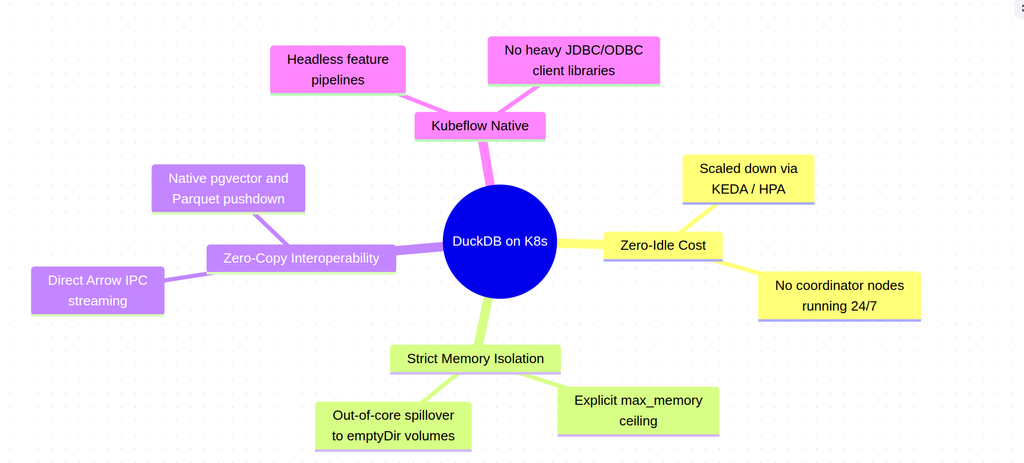
- Near-Zero Idle Cost: Unlike multi-node warehouses that require always-on coordinator and worker nodes, DuckDB engine pods can be scaled down to zero or scaled dynamically using the Kubernetes Horizontal Pod Autoscaler (HPA) or KEDA based on HTTP request volume.
- Predictable Memory Footprint: DuckDB adheres strictly to its configured
max_memoryboundary, utilizing out-of-core disk spillover (backed by ephemeral K8semptyDirvolumes) to preventOOMKilledtermination during large joins or vector transformations. - True Hybrid Analytics (Lake + Relational + Vectors): By federating Parquet lakehouse storage with
pgvectorinside PostgreSQL, analysts can evaluate vector embeddings alongside historical data without requiring separate vector synchronization pipelines or specialized graph databases. - Reproducibility with Kubeflow: Pipeline tasks executed in Kubeflow can call the internal
[http://duckdb-service.analytics.svc.cluster.local:8000/api/query](http://duckdb-service.analytics.svc.cluster.local:8000/api/query)endpoint, generating training feature tables directly from raw lakehouse files and live database state without custom driver configurations.
Running DuckDB on Kubernetes decouples data volume from compute cost, giving engineering teams a high-performance, compliant, and cost-efficient analytical foundation without the overhead of heavy distributed engines.

